🔷 Introduction
APIs form the backbone of every modern platform — especially in cloud-native, DevOps, and SDV ecosystems.
Whether it’s:
Developers provisioning cloud workspaces
Simulators fetching job details
CI/CD pipelines triggering deployments
Partner/OEM services integrating with your platform
Mobile/web dashboards calling backend microservices
Everything flows through APIs.
But unmanaged APIs lead to:
API Management (API-M) solves all of this by offering:
Security
Throttling
Version control
Monitoring
Developer onboarding
Hybrid connectivity
Global distribution
This guide covers exactly how to implement API Management for enterprise cloud & SDV environments.
🔷 1. Why API Management Is Critical in Modern Platforms
❌ Problem 1 — APIs are scattered across services
Kubernetes services, Azure functions, simulators, CI tools → all running independently.
❌ Problem 2 — No centralized control
Different teams expose APIs in different ways.
❌ Problem 3 — Security gaps
APIs exposing secrets, credentials, or open endpoints.
❌ Problem 4 — Versioning is chaotic
Breaking backward compatibility disrupts consumers.
❌ Problem 5 — No analytics
Teams don’t know:
Most used APIs
Error hotspots
Who is consuming what
API performance metrics
All solved by a single API-M layer.
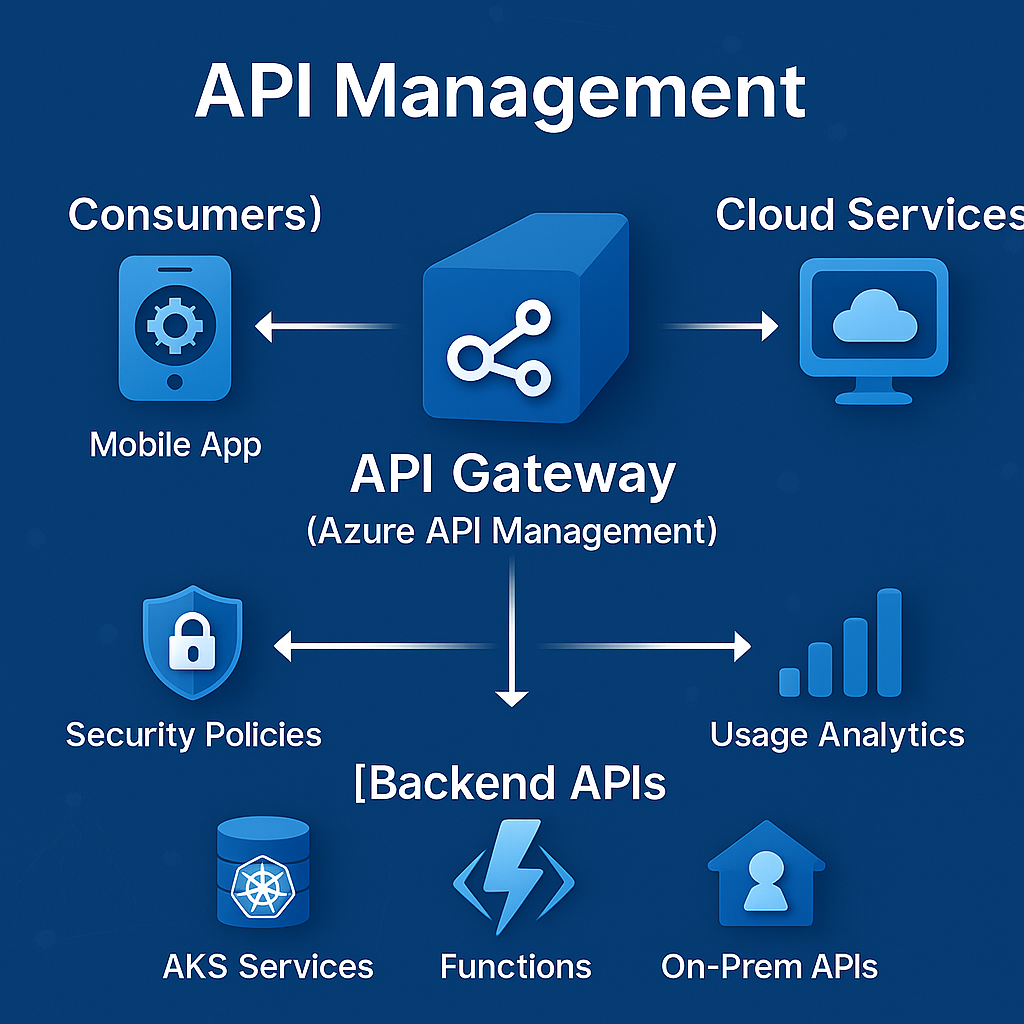
🔷 2. API Management Architecture Overview
Enterprise API-M setup includes:
🔷 3. Step-by-Step API Management Implementation Guide
⭐ STEP 1 — Deploy Azure API Management (API-M)
Choose the tier based on use case:
Developer Tier
Premium Tier
Enterprise-scale
VNET integration
High throughput
Multi-region replication
This is recommended for SDV & automotive platforms.
⭐ STEP 2 — Import Backend APIs
You can import APIs from:
Best practice → maintain OpenAPI specs in Git.
⭐ STEP 3 — Apply API Policies (The Real Power of API-M)
API-M uses policies for:
✔ Authentication (JWT, OAuth2, AAD)
✔ Rate limiting
✔ Caching
✔ IP whitelisting
✔ CORS control
✔ URL rewriting
✔ Response shaping
✔ Header injection
✔ Mock responses for local testing
Example rate-limiting policy:
Example enforce AAD authentication:
These policies remove the burden from backend microservices.
⭐ STEP 4 — Configure API Versioning
Use versioning formats:
Best practice → URI + header versioning combined.
⭐ STEP 5 — Enable Developer Portal
Azure API-M’s developer portal provides:
API documentation
Try-it console
Token generation
Usage history
Subscription keys
Team onboarding
This is extremely useful for external partners (OEMs, suppliers, customers).
⭐ STEP 6 — Add Security Layers
🔒 1. Azure AD Authentication (Top recommended)
🔒 2. Subscription keys
Each consumer gets a unique key.
🔒 3. IP restrictions
Block traffic from unauthorized networks.
🔒 4. Throttling
Protects backend systems.
🔒 5. Private Endpoints
Expose private APIs only within VNET.
⭐ STEP 7 — Integrate API-M with Hybrid Cloud
For SDV & automotive:
On-Prem APIs → Exposed via:
VPN
ExpressRoute
Connected via VNET
API-M can proxy calls to:
This allows seamless connectivity between cloud workloads and automotive labs.
⭐ STEP 8 — Set Up Observability for APIs
Use:
Application Insights
API-M Analytics
Kusto
Log Analytics
Monitor:
Example Kusto query:
⭐ STEP 9 — Build a Full CI/CD Pipeline for API Changes
API-M can be deployed using:
ARM templates
Bicep
Terraform
GitHub Actions
GitLab CI/CD
Example pipeline steps:
Lint OpenAPI
Validate policies
Deploy to API-M (Dev)
Run tests
Promote to QA/Prod
⭐ STEP 10 — Add Usage Analytics Dashboards
Track:
FinOps dashboards → useful for chargeback per team.
🔷 4. Real Implementation Workflow Example (SDV Platform)
Scenario: Developer Uses SDV Simulation API
Developer logs into API portal
Gets token via Azure AD
Calls /simulation/start API
API-M validates JWT
Policy enforces rate-limit
API-M forwards request to AKS microservice
Microservice triggers Airflow DAG
Simulation runs
Logs flow into App Insights
Usage analytics updated
Everything is secured, monitored, governed.
🔷 5. Best Practices
✔ Keep policies modular
✔ Store OpenAPI files in Git
✔ Use KeyVault for secrets
✔ Enforce subscription keys
✔ Never expose backend services directly
✔ Leverage multiple API-M instances for large tenants
✔ Use private endpoints for sensitive APIs
🔷 6. Common Anti-Patterns
❌ Directly exposing backend services
❌ Hard-coding secrets in policies
❌ Missing rate-limits leading to outages
❌ No versioning strategy
❌ No analytics → blind operations
❌ No self-service developer portal
Avoid these to keep APIs secure, stable, and scalable.
🔷 Conclusion
API Management is the central nervous system of cloud platforms.
It provides:
Secure API exposure
Governance
Global accessibility
High availability
Observability
Onboarding simplicity
Partner integration
Traffic control
Versioning discipline
In SDV, cloud-native, and enterprise ecosystems — API-M is not optional.
It is an absolute requirement.